TUTORIAL
SITE CONCEPT
Yes, there is a learning curve to learn how to best utilize the site, but it is not rocket science - once you understand the basics, it's like riding a bike. The main strength of this site is your ability to quickly and easily cross-reference the various dynamic data sets affecting offshore fishing conditions, and we give you the tools to make your own analyses. Each data set (altimetry, sea temps, water color, etc.) has favorable and unfavorable areas on the respective imagery - the key here is to look for overlapping favorable areas...this will really narrow-down where you want to go, and equally important, where NOT to go. Since you have unlimited access to the imagery, you can monitor the site in the days preceding your trip to observe the tendencies of the different imageries, and it's a good idea to print out the different imageries for each day and place in a log book. You should therefore have a definite idea of where you want to go before you even leave the dock.
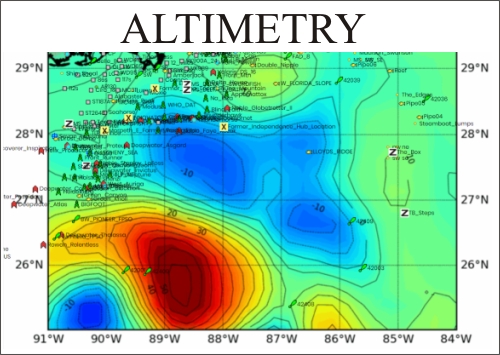
EXAMPLE: When I want to go fishing, the first image that I'll look at is the Altimetry, which shows where the nutrient-rich (upwelling areas) and the nutrient-poor (downwelling areas) are positioned. Once I have determined which areas are favorable, I make a note of which waypoints are located in the favorable areas. This will allow me to reference the different imageries against one another relative to the same waypoint locations. Usually the second image I will then look at is the Sea Temp Imagery . Depending on what species of fish that I am after, the Sea Temp Imagery will show which areas contain optimal temperature areas for that species (this applies mainly to pelagics, as reef fish tend to stay on the structure where they live). Another key feature of this imagery is your ability to pinpoint the tempbreaks which could indicate the location of rips/weedlines (if there is Sarassum out there, it will collect along the breaks).
IMPORTANT: You can optimize the imagery based on your own specs to pinpoint subtle tempbreaks; refer to Sea Temp Imagery for more info on that subject. Thirdly, I'll pull up the Chlorophyll (Water Color) imagery and look at the water color in the area that I'm interested in going...I can see which waypoints are located in green water vs which ones are in blue water.
Let's do an example cross-reference of the imagery... Say, I'm heading off the Mississippi Delta and I want to target the deepwater rigs and Floaters . Here's the imagery, and how to read where to go - I'm starting off with the Altimetry...
This information Copyrighted 2010 Hilton's Fishing Charts - All Rights Reserved.